
This guide explains the AgroDex Account page (/account) for managing your profile, password, and sign-in sessions.
The page requires a sign-in. The hero carries the badge
This guide explains the AgroDex Account page (/account) for managing your profile, password, and sign-in sessions.
The page requires a sign-in. The hero carries the badge
Contents:
The first section stores your personal information and preferences.
| Field | Required | Notes |
|---|---|---|
| Display name | Yes | The name shown inside the app |
| Phone | No | A number you can be reached at |
| Company name | No | Your organisation or company |
| Preferred language | No | Use app default, Bahasa Melayu, or English |
| Default crop | No | Your main crop, for example Padi |
| - | Shown for reference and cannot be changed here |
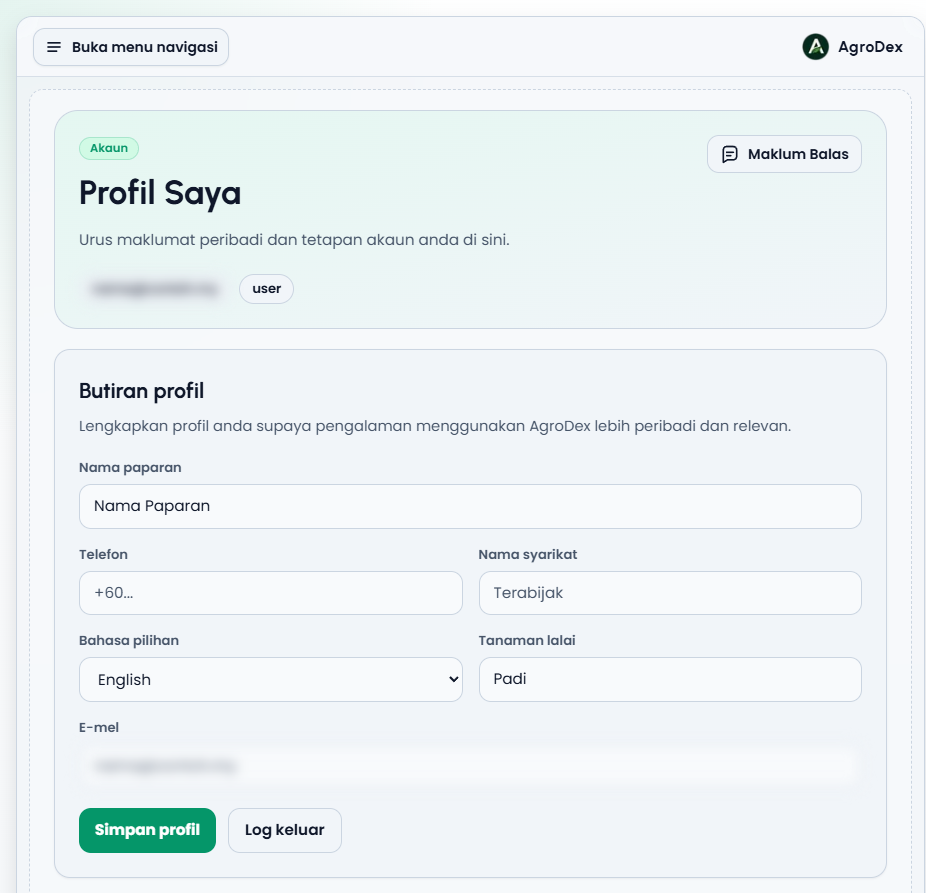
Display name is required. If that field is empty, the system rejects the save and shows Display name is required.
After you press Save profile, the app switches to the chosen language immediately, and every later visit uses it.
Default crop is stored with your profile so your crop preference lives in one place. Leave it empty if you do not need it.
The second section changes your account password.
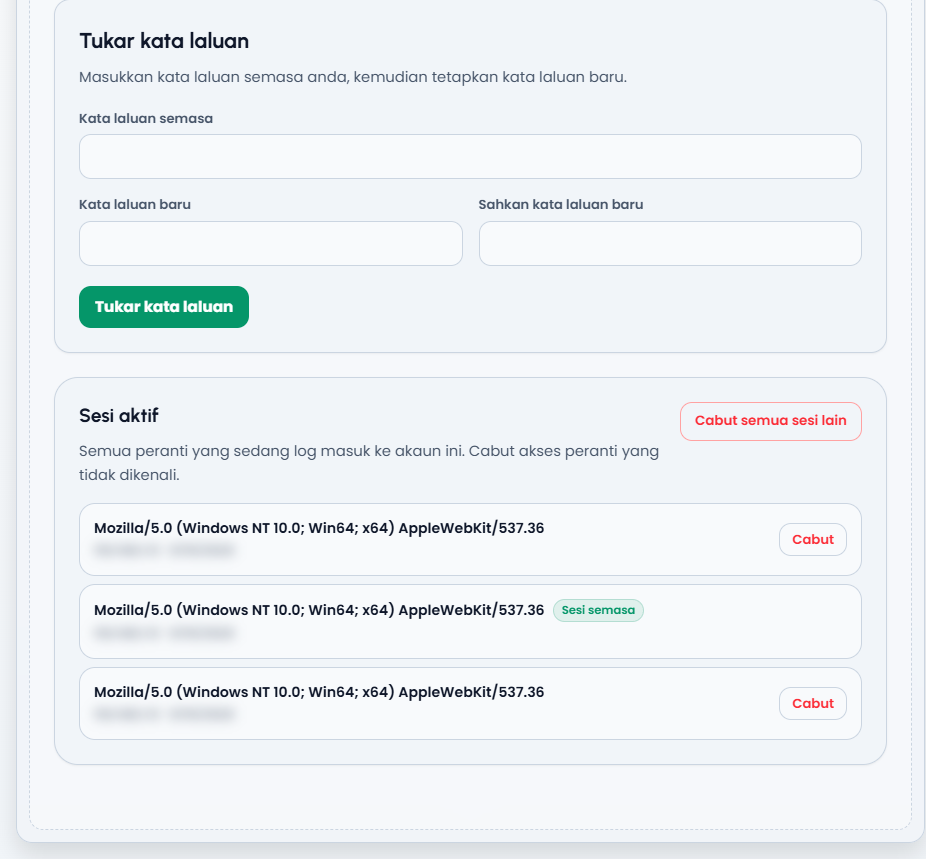
On success, Password changed successfully. appears and the password fields are cleared.
Checks performed before submitting:
| Situation | Message |
|---|---|
| The new password and the confirmation differ | New passwords do not match. |
| The new password is shorter than 8 characters | New password must be at least 8 characters. |
| The current password is wrong | Current password is incorrect. |
| The session has been open too long | Your session is no longer fresh. Sign out and sign back in before changing your password. |
The third section lists every device currently signed in to your account.
Each row shows:
The Revoke all other sessions button at the top right ends every session except the current one.
After the action, Session revoked. or All other sessions revoked. appears.
If the list cannot be read, the message Your session is no longer fresh. Sign out and sign back in to view or revoke active sessions. is shown; sign out and sign back in, then reopen this page.
The Sign out button in the profile section ends the session on this device and takes you out of the app. While it runs, the button shows Signing out....
Signing out does not end sessions on other devices. For those, use Revoke or Revoke all other sessions in the Active sessions section.
The Data and privacy section lets you review the effect of deleting your account before taking a permanent action. Press Review deletion impact; this only reads record counts and does not change any data.
Automatic deletion also removes the account's SIPP cart, orders, and balance. To continue:
DELETE in upper case.When successful, every account session ends and you are taken out of the app. This cannot be undone once processing begins.
Related SIPP line items are removed with their order. Audit logs are reduced to minimum evidence without a direct link to your account. Farms that you manage for someone else are not deleted; your manager access is removed, and images and free-form notes you added to those records are cleared.
| Message | Meaning | What to do |
|---|---|---|
Profile updated. | Changes were saved | Nothing further |
Display name is required. | The display name is empty | Fill it in, then save again |
Unable to update your profile. | The server rejected the request | Try again; if it repeats, contact an administrator |
Unable to reach the profile service. | The connection failed | Check your internet connection and try again |
Password changed successfully. | The new password is active | Use it on your next sign-in |
Current password is incorrect. | The current password is wrong | Retype the correct current password |
New passwords do not match. | The confirmation differs | Make both fields identical |
New password must be at least 8 characters. | The password is too short | Use at least 8 characters |
Your session is no longer fresh... | The session needs to be renewed | Sign out and sign back in |
Session revoked. | That device was signed out | Nothing further |
All other sessions revoked. | Every other device was signed out | Nothing further |
No active sessions found. | No session records | Reload the page |